LifeLoggerz StudyTimer — Turning Focus into Feedback Loops
⏱ LifeLoggerz StudyTimer — Turning Focus into Feedback Loops
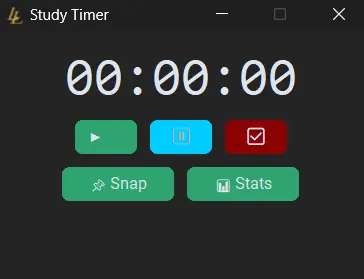
Every morning before diving into my research, I open a small dark-themed window titled Study Timer. It sits quietly in the top-right corner of my screen, tracking time spent in deep work without internet, accounts, or distractions.
And when I cross a milestone — 15 minutes, 1 hour, 2 hours — a little sound plays. A meme. A cheer. A reward for focus.
This is LifeLoggerz StudyTimer, a minimalist app I wrote in Python using CustomTkinter and Pygame to turn long hours into measurable, audible progress.
🧩 1. Why I Built It
I needed something simple — something that:
- Tracks exact time spent actually working (excluding breaks)
- Logs timestamps for start, pause, resume, and finish
- Runs locally, even during Wi-Fi outages
- Feels satisfying instead of sterile
Most timers were either overbuilt or locked behind accounts and subscriptions. So I wrote my own.
Now it’s the backbone of my daily study routine — every serious session starts here, and its logs flow into my productivity sheets later on.
⚙️ 2. The Interface

The UI is deliberately minimal: a big digital timer and a tight row of buttons underneath.
- ▶️ Start — starts or resumes the session
- ⏸️ Pause — pauses and records break start
- ✅ Done — ends the session and shows a summary
Each button has a small tooltip that appears on hover (“Start or resume study”, “Pause study session”, etc.), which keeps things intuitive without adding clutter.
There’s also a 📌 Snap button to pin the window in the top-right of the screen, and a 📊 Stats button that opens a live stats panel with:
- Current study time
- Total break time
- Number of breaks
- Milestones hit
- A scrolling log of timestamps (Start / Pause / Resume / Done)
🎧 3. Victory Sounds & Milestones
The StudyTimer rewards consistency through milestone sounds. Every time you cross a focus checkpoint — 1 minute, 15 minutes, 30 minutes, 1 hour, 2 hours, and so on — it checks if that milestone has already been hit. If not, it:
- Plays a sound file (chime, meme, or music clip)
- Flashes the timer text green for a second
- Shows a short motivational message for about 10 seconds
Here’s a simplified version of the milestone map, written in plain Python:
milestones = {
    1:   ("ding-sound-effect_2.mp3", "🚦 We’re going!"),
    15:  ("success-chime.mp3", "✅ Nice pace!"),
    60:  ("bad-to-the-bone-meme.mp3", "🔥 You beast!"),
    120: ("vine-boom.mp3", "🚀 2 HOURS! LEGEND!"),
    300: ("heavenly-music-gaming-sound-effect.mp3", "🌟 5 HOURS! Demigod."),
    600: ("que-lindo-que-lindo-que-lindo-evaldo-jose-cbn.mp3", "🎯 10 HOURS! Beautiful!"),
}
Some of the messages you’ll see along the way:
“💰 Stacking minutes!” “🙌 7 hours. Hallelujah!” “📈 Right on track.”
It’s a small dopamine loop, but it makes long sessions feel like progress instead of just clock time.
🧮 4. Ending a Session & Seeing the Summary
When you click ✅ Done, the app asks if you’re sure and then compiles a clean summary using the timestamps it has been collecting:
🕐 Total Study Time: 2:47:13
☕ Total Break Time: 0:22:19
🔁 Number of Breaks: 3

⏱️ Timestamps:
Start: 8:32:01am
Break 1 Start: 9:15:02am
Break 1 Resume: 9:20:45am  (⏳ 0:05:43)
End: 11:19:14am
I usually copy this summary straight into my Google Sheets:
- Raw Data logs
- Daily Snapshot
- Weekly productivity review
Over time, that gives me a clear record of when I worked, how long I actually focused, and how many breaks I took.
🧠 5. Building Flow through Feedback
StudyTimer isn’t about grinding; it’s about acknowledging focus.
- 🎵 The audio feedback makes progress tangible
- 📊 The stats window keeps you honest about breaks
- 🧘 The minimal UI removes decision fatigue
There are no projects to set up, no tags, no to-do list. Just a timer, a few buttons, and a feedback loop.
Every “Start → Pause → Resume → Done” cycle is a tiny experiment in flow.
🧰 6. Under the Hood (for the Nerds)
A few technical notes for anyone curious (or wanting to build something similar):
- CustomTkinter handles the dark-mode GUI, tooltips, buttons, and stats window
- Pygame powers the audio playback for milestone sounds
datetime+timedeltatrack study time vs. break time precisely- Toplevel windows provide a separate, always-on-top stats panel
- A
resource_path()helper keeps file paths working in both dev mode and compiled.exebuilds
Everything runs locally. No accounts, no servers, no API calls.
🪶 7. Planned Upgrades
I’m slowly adding features while keeping the core experience simple. On the roadmap:
- 🪄 Session naming (e.g., “Thesis – Chapter 4”, “Calorimetry Data Cleanup”)
- 📤 Automatic CSV / Google Sheets export with date, duration, and break stats
- 🎧 Sound themes — Classic, Meme, Chill, etc.
- 🕹️ Compact overlay HUD for multi-monitor flows
When these land, I’ll update the app and this post with a small changelog.
💾 8. Download the App
You can grab the Windows build from the Templates page:
→ View StudyTimer on the Templates page
Or, if you just want the direct link:
⬇️ Download StudyTimer (Windows .exe in ZIP)
🧩 Final Thoughts
The LifeLoggerz StudyTimer is how I measure the invisible: the quiet hours that actually move projects forward.
“Focus doesn’t need to feel heavy — it just needs to feel acknowledged.” — LifeLoggerz