Building a One-Handed Productivity System with AutoHotkey
⌨️ Building a One-Handed Productivity System with AutoHotkey
For the past year, I’ve been quietly building a productivity system that runs almost entirely from my left hand on the keyboard. No mouse. No clicking through folders. No retyping the same phrases.
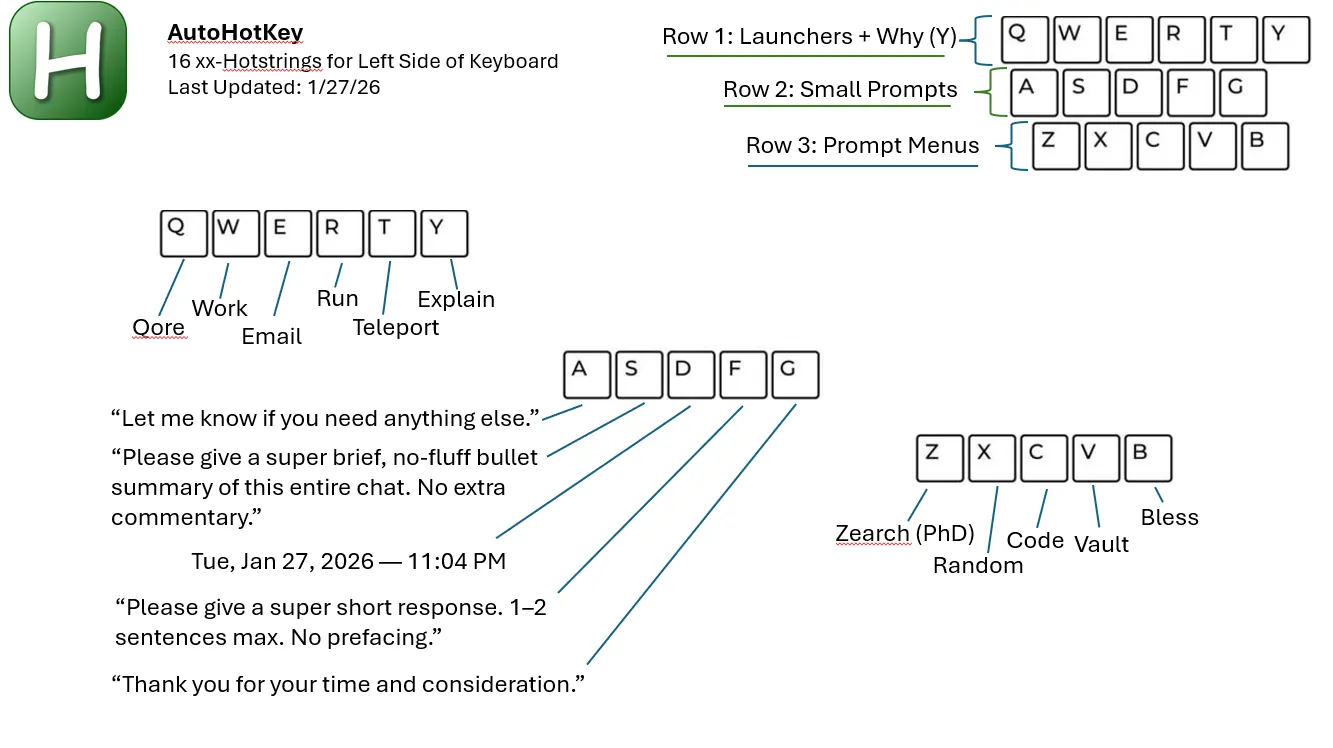
Just 16 simple AutoHotkey hotstrings, all ending in xx.
With those alone, I can:
- Instantly arrange my workspaces
- Teleport into project folders
- Launch full workflows
- Paste smart boilerplate with live inputs
- Trigger advanced ChatGPT prompt menus
- Summarize conversations in one keystroke
This post breaks down the breakthroughs behind the system and how anyone can build something similar.
🧠 The Core Idea: One Hand, Infinite Workflows
Every hotstring in my system ends with:
xxSo instead of remembering dozens of shortcuts, I only memorize:
16 easy prefixes + xx
Examples (conceptually):
- Layout arrangers
- App openers
- Workflow teleporters
- Prompt menus
- Smart paste tools
Your left hand never leaves the keyboard. Your brain stays in flow. And everything becomes muscle memory.
🧩 The 4 Pillars of My AutoHotkey System
⚡ 1. Layout Arrangers & App Openers
One command can open ChatGPT, Obsidian, my code editor, and file explorer, then snap everything into position across monitors.
Instead of spending 2 to 5 minutes setting up each morning, it happens instantly.
This alone saves me hours every week.
📁 2. Folder & Workflow Teleporters
I don’t browse directories anymore. I type:
projectxxAnd I’m instantly inside the exact folder I need.
No more:
Documents -> PhD -> Scripts -> Version 4 -> Output -> Final -> MaybeFinal -> ActuallyFinalJust teleport.
✍️ 3. Smart Phrases (Tiny but Powerful)
I reuse certain phrases constantly. For example:
Please give a super brief, no-fluff bullet summary of this entire chat. No extra commentary.
Instead of retyping it every time, one hotstring pastes it instantly.
It sounds small, but repeated hundreds of times, it saves real hours.
🤖 4. ChatGPT Prompt Menus (The Game Changer)
This is where things truly leveled up.
I built interactive AutoHotkey menus that:
- Pop up with structured options
- Ask for inputs
- Generate full prompts automatically
Examples include:
- Summarization menus
- Code refactor workflows
- Analysis prompts
- Brainstorming assistants
It’s like having a personal AI control panel.
No remembering prompts.
No messy typing.
Just choose -> fill -> send.
🎯 Why I Limited It to 16 Hotstrings
Instead of building hundreds of shortcuts, I focused on:
- A small powerful core
- Easy memorization
- Infinite customization
With just 16 hotstrings, I already handle:
- Daily tasks
- Research workflows
- Coding automation
- Writing
- Planning
- AI prompting
And I can always extend later.
Simple scales better than complex.
📂 Sharing the Script
The full system is built in AutoHotkey v1.1 and is free to modify.
It’s:
- Lightweight
- Beginner friendly
- Extremely powerful
If you can edit text, you can customize it.
I’ll be sharing the script publicly so others can build their own productivity OS.
🚀 The Breakthrough: Your Own Productivity Operating System
Most people rely on generic productivity apps.
Real efficiency comes from building a personal system around how you think and work.
AutoHotkey allowed me to:
- Remove friction
- Eliminate repetitive actions
- Stay in deep focus
- Move at thought speed
Once you experience that, it’s hard to go back.
📌 Final Thoughts
This system didn’t happen overnight.
It evolved from:
- Frustration with repetitive tasks
- Curiosity about automation
- Hundreds of tiny experiments
But today, it’s something I use every single day.
If you’re serious about productivity, learning AutoHotkey is one of the highest-ROI skills you can pick up.
You don’t need hundreds of scripts.
Start small.
Build your own OS.
🔗 Related LifeLoggerz Automation Posts
This article is part of the LifeLoggerz Productivity Systems series:
1️⃣ AutoHotkey One-Handed Workflow (this post)
2️⃣ Google Sheets as a Life Database (coming soon)
3️⃣ ChatGPT + Automation Pipelines (coming soon)
4️⃣ Python for Research & Personal Systems (coming soon)
“Productivity isn’t about doing more. It’s about removing friction between thought and action.”
— LifeLoggerz